
What does a HIPAA compliance checklist cover?
A HIPAA compliance checklist covers the three safeguard categories of the HIPAA Security Rule: administrative safeguards (risk assessments, policies, training, BAAs), physical safeguards (facility access, device security, hardware disposal), and technical safeguards (encryption, access controls, audit logs, incident response). It also covers documentation requirements OCR expects during audits and breach investigations.
If you manage a healthcare organization, HIPAA compliance probably is not the reason you got into this field. But it is a reality you cannot afford to ignore, and the enforcement environment makes that clearer every year.
The Office for Civil Rights (OCR) has significantly stepped up enforcement over the past two years. In the first five months of 2025 alone, OCR announced 10 settlements with healthcare organizations, with fines reaching $3 million per case. The common thread in nearly every case was not a sophisticated cyberattack. It was a failure to conduct a documented, enterprise-wide security risk analysis. The organizations that fare best in audits and investigations are not the ones with the most advanced technology. They are the ones with the most consistent documentation.
At the same time, the threat environment has never been more active. Healthcare data breaches have hit record highs, and small and midsize practices are now primary targets because attackers treat them as the softest entry point in the system. Your tech environment has never been more complex, between remote staff, cloud systems, and EHR integrations that create new exposure with every connection.
This HIPAA compliance checklist is built for real-world healthcare delivery, where IT teams are small, risk is high, and administrators are already stretched thin. It covers what OCR actually looks for, what your IT environment needs to support, and where most practices fall short before an audit finds them.
Is Your HIPAA Documentation Audit-Ready?
What Is Changing in HIPAA Compliance in 2026?
OCR Enforcement Priorities
OCR has made its enforcement priorities clear: security risk analysis failures, inadequate access controls, and missing Business Associate Agreements are the three most commonly cited violations in recent settlement actions. In one notable 2025 case, a covered entity paid $1.19 million after failing to conduct a compliant risk analysis despite multiple prior OCR investigations. The pattern across settlements is consistent: organizations that cannot produce documentation of their compliance program pay the price for that gap, not just organizations that suffer breaches.
OCR has also made clear that small providers and long-term care facilities are not exempt. In fact, those with weaker documentation and fewer technical safeguards often face the most scrutiny precisely because their risk exposure is higher relative to their resources.
Regulatory Updates Affecting Your Compliance Program
HHS has proposed updates to the HIPAA Security Rule that would raise the compliance bar for all covered entities, with final action now projected for July 2027. Proposed changes include mandatory multi-factor authentication, more explicit requirements for access controls and audit logging, and a 72-hour window to restore critical systems after an incident. The proposed HIPAA 2025 Security Rule update covers these changes in detail and what they mean for your compliance program.
The enforcement side and the regulatory update side point to the same conclusion: compliance in 2026 is about proof, not intent. What the full healthcare cybersecurity regulatory stack actually requires, from mandatory HIPAA provisions to the voluntary frameworks that reduce OCR penalty exposure, is the right context for building that proof. The burden of documentation, risk assessment, and technical controls is on your organization regardless of size.
Why Specialty Practices and Healthcare Providers Are High-Risk Targets
According to 2024-2025 HHS breach reports, small and midsize healthcare organizations made up over 60% of reported cyber incidents. That includes private practices, outpatient clinics, and long-term care facilities such as senior living communities. The reason is straightforward: attackers target the softest entry points, and smaller organizations typically have fewer technical controls, smaller IT teams, and less consistent documentation.
Specialty and senior care settings often rely on shared workstations, aging hardware, and cloud tools that do not integrate cleanly. Ransomware groups know this. They target these environments because the stakes are high, and the urgency to restore operations often leads to faster payouts and quieter settlements. It also means a higher risk of regulatory penalties if incident response plans are not solid.
The most common vulnerabilities found in these environments are shared devices where multiple staff log in under a single account, cloud storage misconfigurations exposing sensitive data, and unpatched endpoints that have not received a security update in months. These are not hypotheticals. They are the findings from every risk assessment we conduct.
Understanding your risk surface is where HIPAA compliance has to start. For a strategic framework covering how cybersecurity risk management should function at the organizational level, see Why Your Healthcare IT Provider Needs to Think Like a Risk Manager.
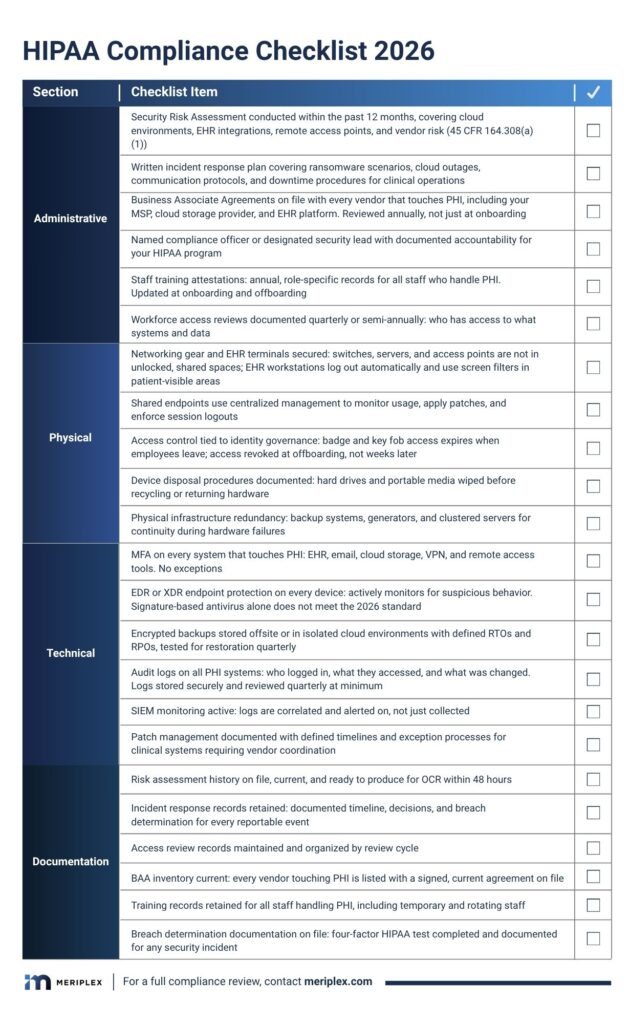
The 2026 HIPAA Compliance Checklist
Compliance is not just about having policies. It is about whether your systems, people, and partners actually reduce risk. This checklist covers what OCR looks for and what your IT environment needs to support.
Administrative Safeguards
Administrative safeguards make up more than half of the HIPAA Security Rule requirements. This is where HIPAA and IT strategy meet in practice.
- Current HIPAA Security Risk Assessment: Conducted within the past 12 months, covering cloud environments, EHR integrations, remote access points, and vendor risk. A risk assessment is an explicit OCR requirement under 45 CFR 164.308(a)(1). If you have not done one recently, see how a formal SRA differs from a general IT risk review.
- Written incident response plan: Goes beyond ‘call IT.’ Covers ransomware scenarios, cloud outages, communication protocols, and downtime procedures for clinical operations.
- Business Associate Agreements on file: Signed BAAs with every vendor that touches PHI, including your MSP, cloud storage provider, and EHR platform. Reviewed annually, not just at onboarding.
- Named compliance officer or designated security lead: Someone with documented accountability for your HIPAA program, not just your IT vendor.
- Staff training attestations: Annual role-specific training records for all staff who handle PHI. Updated at onboarding and offboarding.
- Workforce access reviews: Documented quarterly or semi-annual reviews of who has access to what systems and data.
Physical Safeguards
Physical safeguards are the most commonly overlooked HIPAA category, and one of the first things auditors check.
- Secure networking gear and EHR terminals: Switches, servers, and access points are not in unlocked, shared spaces. EHR workstations log out automatically and use screen filters in patient-visible areas.
- Managed shared endpoints: Shared tablets or workstations use centralized endpoint management to monitor usage, apply patches, and enforce session logouts.
- Access control tied to identity governance: Badge entry and key fob systems expire when employees leave. Access is revoked at offboarding, not weeks later.
- Device disposal procedures: Documented processes for wiping and destroying hard drives and portable media before recycling or returning hardware.
- Physical infrastructure redundancy: Geographically distributed data centers or backup systems, generators, and clustered servers for continuity during hardware failures.
Technical Safeguards
Most breaches happen because of a missed update, a weak password, or a clicked phishing link, not a sophisticated exploit. Technical safeguards are real defenses built into daily operations.
- MFA on every system that touches PHI: EHR, email, cloud storage, VPN, and remote access tools. No exceptions.
- Next-generation endpoint protection: Every laptop, workstation, and tablet should have EDR or XDR tools that actively monitor for suspicious behavior. Antivirus alone does not meet the 2026 standard.
- Encrypted and tested backups: Backups are encrypted, stored offsite or in isolated cloud environments, with defined RTOs and RPOs, and tested for restoration quarterly.
- Audit logs on all PHI systems: Every system with PHI access generates logs covering who logged in, what they accessed, and what was changed. Logs are stored securely and reviewed quarterly at minimum.
- SIEM monitoring: Active monitoring of access logs for unusual patterns or signs of a breach, not just passive log storage.
- Patch management: Documented, regular patching of operating systems and applications handling ePHI, with exception processes for clinical systems requiring vendor coordination.
Endpoint HIPAA Compliance Template
Endpoints are the most common HIPAA vulnerability in specialty practices and outpatient settings. Use this template to evaluate and document your endpoint compliance posture. Each item maps to a specific HIPAA Security Rule requirement.
Endpoint HIPAA Compliance Template
Device Inventory and Classification
- All endpoints that access ePHI are inventoried and classified | 45 CFR 164.310(d)(1)
- Inventory is reviewed and updated quarterly | 45 CFR 164.310(d)(1)
- End-of-life devices with PHI access are tracked and decommissioned on schedule | 45 CFR 164.310(d)(2)(i)
Access Controls
- Each user has a unique login with no shared credentials | 45 CFR 164.312(a)(2)(i)
- MFA is enabled on all endpoints accessing ePHI | 45 CFR 164.312(d)
- Automatic screen lock activates after 15 minutes of inactivity | 45 CFR 164.312(a)(2)(iii)
- Remote wipe capability is configured on all portable devices | 45 CFR 164.310(d)(2)(i)
Endpoint Protection
- EDR or XDR software is deployed and active on all in-scope endpoints | 45 CFR 164.312(a)(1)
- Endpoint protection definitions and software are updated at least weekly | 45 CFR 164.308(a)(5)(ii)(B)
- Patch management is documented with exception processes for clinical systems | 45 CFR 164.308(a)(5)(ii)(B)
Audit and Monitoring
- Endpoint activity logs are generated and retained per policy | 45 CFR 164.312(b)
- Logs are reviewed quarterly by a named responsible party | 45 CFR 164.312(b)
- Anomalous access events trigger documented review and response | 45 CFR 164.308(a)(1)(ii)(D)
Incident Response
- Endpoint-specific incident response procedures are documented | 45 CFR 164.308(a)(6)(i)
- Staff know the steps to report a lost or compromised device | 45 CFR 164.308(a)(6)(ii)
- Breach determination procedure includes four-factor HIPAA test | 45 CFR 164.402
Role-Based Access: The Most Overlooked HIPAA Risk
Most practices think they are secure enough because they have antivirus installed and passwords in place. One of the most consistent compliance gaps we find is over-permissioned users. In 2025, overpermissioned access is one of the top root causes of HIPAA violations, and it is almost always preventable.
The question is not whether you have access controls. It is whether they are configured correctly. Does your front desk staff need access to clinical notes? Should a billing contractor be able to see full patient charts? Is anyone using a shared login to ‘make it easier’? These are not just workflow issues. They are audit risks.
A compliant IT environment uses role-based access control (RBAC) to ensure each person can only access the systems and data they need to do their job. For specialty practices and long-term care communities, that means:
- Providers access EHR data and clinical tools
- Billing has visibility into financial systems, not diagnoses
- Admin staff can schedule appointments but cannot see treatment plans
This is required under the HIPAA Security Rule, not optional best practice.
Not Sure Whether Your Access Controls Are Configured Correctly Across All Your Systems?
Modern cloud-based EHRs and scheduling platforms offer granular access controls. The problem is that most teams do not configure them correctly, or at all. Your MSP or IT partner should be helping you define roles, apply permissions, and review access regularly. For guidance on what to require from that partner, see HIPAA-Compliant MSP: How to Choose the Right Healthcare IT Partner.
Staff Training and HIPAA Awareness
Why Training Is Still the Biggest Variable
You can have the best firewalls and encrypted backups in the world. All it takes is one click on a phishing email to put patient data at risk. HIPAA compliance is half systems, half human behavior. With ransomware attacks getting smarter and phishing lures more realistic, your staff is either your strongest defense or your weakest link.
Training needs to be ongoing with role-specific refreshers every year, interactive with simulations and real scenarios, and timely by being built into onboarding and reinforced at offboarding. In high-turnover environments like urgent care or long-term care, temporary staff and rotating shift workers often get skipped in training cycles. They are still handling PHI and logging into shared systems.
What Effective Training Programs Include
- Phishing simulations: Regular, unannounced tests that teach pattern recognition and reinforce caution
- Breach response drills: Scenario-based exercises so staff know what to do when something goes wrong
- Access audits during offboarding: Shut down logins, deactivate email accounts, and revoke badge access the moment someone leaves
- Documentation: Training attestation records stored in a format OCR can review during an investigation
Cloud Platforms and HIPAA Compliance
The Shared Responsibility Model
Cloud tools are everywhere now: EHRs, scheduling, billing, and secure messaging. But relying on the cloud does not automatically mean you are HIPAA-compliant. HIPAA compliance in the cloud is a shared responsibility. Your managed security partner might handle encryption, backups, and server patching. You are still on the hook for how the data is accessed, who has permissions, and what happens if something goes wrong.
What to Verify Before Using Any Cloud Platform
- Does the vendor encrypt data at rest and in transit?
- Is there documented redundancy with a tested recovery process?
- How quickly do they notify you after a breach or outage?
- Do they sign a Business Associate Agreement?
- Is your MSP monitoring the cloud environment for abnormal behavior?
- Are your backups isolated from ransomware threats, not just stored in the cloud?
Cloud platforms can support HIPAA compliance, but only if you treat them as part of your broader risk strategy. When in doubt, ask your vendor or MSP to walk you through how your PHI is protected. If they cannot explain it clearly, that is your answer.
Compliance Documentation: What OCR Expects
The Evidence Standard
HIPAA audits are not about intentions. They are about receipts. OCR reviews documentation, and the bar for what constitutes adequate documentation has risen significantly with the 2025 enforcement actions. Here is what OCR expects to find organized and accessible:
- Current HIPAA risk assessment: Updated within the past 12 months, available immediately if requested—schedule yours here if it is overdue
- Security incident logs: How issues were tracked, escalated, and resolved
- User access reviews: Documentation confirming only the right people have access to PHI
- BAA register: Signed copies of all Business Associate Agreements with current vendors
- Staff training attestations: Records for HIPAA, cybersecurity, and privacy training, updated annually
Tools That Make Documentation Manageable
You do not have to manage compliance documentation manually. Compliance dashboards, secure document vaults, and automated audit logs bundled with MSP support make tracking and reporting significantly easier. Some MSPs offer compliance-as-a-service, taking on the logging, reminders, and reporting so you are not scrambling when an audit notice arrives.
If you are still managing HIPAA documentation in a shared folder, it is time for an upgrade. Auditors do not give credit for good intentions. They review what you can show them.
How Managed IT Services Support HIPAA Readiness
Most specialty practices and healthcare organizations do not have a full-time compliance officer sitting next to an in-house cybersecurity expert. That is where managed IT services take the pressure off. A good partner does not just manage your firewalls. They help you build an environment where compliance is baked into the system, not bolted on before an audit.
At Meriplex, we work with healthcare providers every day to close the gaps that show up in OCR investigations: missing risk assessments, undocumented access controls, incomplete BAA registers, and endpoints that have not been patched in months. The organizations that pass audits are not the ones with the most expensive technology. They are the ones whose documentation is current and whose IT environment actually reflects their compliance posture.
For a detailed framework on what your IT partner should be able to demonstrate before you give them access to your ePHI environment, see HIPAA-Compliant MSP: How to Choose the Right Healthcare IT Partner. How HIPAA compliance fits within a complete managed IT services program, from frontline support through audit readiness, is what the complete guide to managed IT services for healthcare was built around.
Is your IT environment built to prove HIPAA compliance?
HIPAA Compliance Is About Trust, Not Just Avoiding Fines
HIPAA compliance is not a checklist to keep auditors happy. It is a reflection of how seriously you take the trust people place in you when they walk into your facility or share their health information with your team.
Done right, compliance is not a burden. It is the structure that makes your systems more reliable, your staff more prepared, and your organization more resilient when something goes wrong. In an environment where healthcare organizations face an average of 40 cyberattacks per year, that structure is not optional. It is operational.
The cybersecurity threats hitting healthcare organizations hardest in 2026 covers what each attack type costs operationally and which HIPAA provisions it triggers when your controls are not in place.
In healthcare, the gap between having a compliance program and being able to prove it is the gap OCR walks through. Close it before they arrive.